Showing posts with label partychat. Show all posts

Thursday, November 10, 2011

Changes afoot: Partychat moving to a new home


There are some changes coming to Partychat over the next few days, and while we hope they won’t have too big an impact on you, we wanted to explain what’s happening.

When Partychat was born, it ran on an ancient desktop in my living room. Two years ago, we moved it over to Google’s App Engine, which made Partychat much more stable and allowed us to add new features more easily. (In case you're not a programmer, App Engine is a platform that allows users to build web apps using Google's infrastructure). App Engine provides a certain amount of resources for free, and at the time, Partychat was small enough that we didn’t have to pay anything. Over time we’ve grown and in recent months we’ve been paying a bit more than $2 per day in fees to run the service.


Recently, Google decided to change their pricing model for App Engine, making Partychat significantly more expensive to operate. In fact, their initially announced prices would have caused Partychat to cost $250 per day at current usage levels (and mind you, we’ve doubled in size over the last 9 months). Google later revised these prices to a more reasonable level, but we would still be paying $25 per day under the new pricing model. $25 may not sound like a lot, but that’s $9,000 per year—and we’re committed to keeping Partychat free, with no advertising, so we literally have no source of revenue other than our own pockets and your kind donations.

We had hoped Google would change its mind yet again and lower prices further, to a sustainable level for us, but that hasn’t happened, and the new prices went into effect this Monday. So we’ve been forced to move Partychat over to Amazon’s Elastic Cloud Computing platform, where we calculate that we can run the service for less than what we were paying even before App Engine’s pricing change*.


As sad as we are to be leaving App Engine, this migration has an upside for us (aside from the savings) in that we’ll finally be able to move Partychat rooms to our custom partych.at domain. In fact, this should be the biggest change you’ll see as part of the migration: Instead of chatting with rooms in partychapp.appspot.com, you’ll now be chatting with them in partych.at. Your room state (members, aliases, ++points, etc.) will stay the same**.

We’ll be embarking on the migration sometime over the next few days. Please bear with us—we’ll try our best, but we don’t expect this to be a completely flawless transition. A huge, incredible thanks to Vijay who has been doing all the work to make the migration happen. And if you love Partychat as much as we do, consider donating to help it keep running for a long time.

-- Akshay


* During this transition, we've had to suspend rooms with more than 100 participants as these few rooms represent a disproportionately large portion of our costs. We hope to reinstate these rooms soon after we've fully migrated Partychat to EC2 and have everyone else running stably. To help keep future costs under control, we may start adding limitations to the number of people and/or the amount traffic in each room. We’ll be keeping you up to date here in this blog, and via our twitter account: @partychat

** In fact, we’re still using App Engine database for the next few weeks. The price hike was for outgoing XMPP messages, which we will now avoid by sending messages via EC2. We’ll write more about this soon.

Wednesday, August 17, 2011

Status update, and how to donate

Thanks to your help, Partychat has been growing like crazy! In fact, 10,000 people say something in Partychat every day now. We’re ecstatic so many of you find it as useful as we do, and so many of you are using it on a daily basis.

Unfortunately, this crazy awesome level of usage has caused us to exceed App Engine’s free resource quota. We’ve been optimizing to stretch the resources out as far as possible, but as our user base grows (yay!) our costs do too (booo!). Thankfully, users have been offering to contribute for a while, and we’ve finally gotten around to making a standard way for you to help:

Donate to Partychat by clicking here. Payments are processed through Amazon and are used solely to defray our server costs. It now runs us upwards of $15 to run Partychat for a week... almost $800 a year. If you use and value Partychat please contribute!

Side note for developers: I recently migrated the Partychat Google Code repository to git from svn. If you’re working on any changes or patches, be sure to re-sync this repository. (And if you weren’t, remember: patches welcome!). The migration process was a bit confusing, and I’ll be writing a separate blog post on that process soon.

Vijay, for the Partychat team.

Monday, February 21, 2011

More Sharing Features

We've enhanced the /share command to use Embedly for generating titles and descriptions of shared links. For example, this means that tweet text is now rendered inline, saving you a click. For YouTube links to get the video description, saving you from possible rickrolls.

Share bookmarklet

Rooms now also have a share bookmarklet, you can find it in the "Helpful links" section of the web interface.

Share bookmarklet

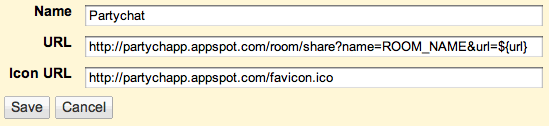
Finally, the share command can also be hooked up to Google Reader's Send to feature. Just go to the settings page and add a custom link with this template:

Reader "Send to" settings

Wednesday, November 17, 2010

Controlling logging (and FAQs)

To enable commands such as /undo and the search-and-replace feature, Partychat keeps a small log of recent messages said in the room (up to 10 for each member). However, we realize that not everyone wants even this form of limited logging, so we've added a preference on the room's web page (accessible at http://partychapp.appspot.com/room/<room name>) that lets you turn off logging:

Partychat settings

You can also enable and disable logging by using the /togglelogging command in the room itself.

We also added an FAQ about what gets logged (not just by Partychat, but by Gmail and your chat client). We didn't actually have an FAQ until now, so we took this opportunity to also write up some of Partychat's more esoteric features, like the PlusPlusBot. If there's anything else that you find confusing about Partychat, feel free to get in touch (how to do that is...wait for it...also in the FAQ).

Monday, November 08, 2010

Fun with aliases

We've recently loosened up restrictions for aliases, so now nearly any Unicode character can be used in them, even a snowman:.

What you type: /alias ☃
What the room sees: 'frosty' is now known as '☃'

Combined with existing support for Unicode support in messages, this can lead to silliness:

What you type: /me <3s ❄
What the room sees: s ❄

And if you ever wonder who's hiding behind an overly clever alias, you can use the /who command.

What you type: /who ☃
What you get back: ☃ (frosty@gmail.com) (online)

P.S. More usefully, this means that non-Latin alphabet speakers can now use aliases with their preferred character set.

Wednesday, May 19, 2010

Friendlier web interface, /share is back, and more

Here's some recent changes that I've made to Partychat:

  • Make the homepage friendlier (and slightly prettier), especially the room creation form.
  • Improve web-based room management (building on what David started), so that you can join, leave, or request an invitation from the room's web page (here's a sample room for the current developers).
  • Prettify the plusplusbot display in the web UI.
  • Add a /share command that makes it easy to share URLs and give some context.
  • Clean up some data layer issues and fix some inconsistencies.
  • And of course, quite a few bug fixes (nothing like scanning the AppEngine logs looking for NPEs).

/share command

There's also been some recent production issues that have kept me busy. For example, yesterday a user invited room A as a member of room B, and vice-versa. As an unintentional side-effect of a change that I made to make the setup process more user-friendly, it became very easy to set off an infinite loop of messages. By the time I realized what was going on, we'd run out of App Engine bandwidth quota. Thankfully after some budget rejiggering and a some quick code change all was well. Similarly, a couple of weeks ago we had CPU usage issues (though optimizing that away was still fun).

It seems like chat is gaining in trendyness, with HipChat launching recently (presumably to challenge the incumbent Campfire) and Brizzly/Thing Labs's Picnics happening. Partychat will probably remain a hobby/fit-within-AppEngine-free-quota sort of project indefinitely, but it's been fun polishing it (and of coure, there's still quite a few things left to fix).

Semi-cross-posted from Mihai's blog.

Thursday, October 08, 2009

Back to the Beta


Marty McFly: Doc, we better back up. We don't have enough road to get up to 88.
Dr. Emmett Brown: Roads? Where we're going we don't need roads.

I'm happy to announce the first major step towards a more reliable, stable, and feature-rich Partychat: Partychapp β.

For the past few weeks, a rogue group of friends have been dedicating their spare time to porting PartyChat over to Google AppEngine. We'd talked about doing this for a long time, but the recently added XMPP support was the missing piece needed to make the whole thing run.

As with the old Partychat, Partychapp is open source and you can track its development through the associated Google Code feeds.

What makes Partychapp better? 95% of Partychat's issues were the result of our Jabber connection -- rate limiting, federation issues, etc. Because Partychapp uses AppEngine's XMPP bridge, jabber connectivity is vastly improved with Partychapp. And those remaining 5% of issues with Partychat? They generally had to do with data persistence, which again AppEngine deals with much more effectively.

Why beta? There are a number of features missing and bugs we need to fix. To track them (and add more!) see: Partychapp Issues. Also AppEngine XMPP doesn't (yet) support custom domains so we can't move partych.at over.

So check out Partychapp β. Instructions on how to set up a room (including a web-based invites system!) can be found at http://partychapp.appspot.com/.

Big, giant, overwhelming thanks go out to Neil, Jason, Kushal, and David who are the people responsible for making Partychapp happen. A special shout out to mpd who added XMPP support to AppEngine, making this all possible.

Wednesday, July 15, 2009

partych.at bots fixed

We (ok, Craig) figured out why @partych.at bots were not accepting new invites -- basically we'd hit the number of un-answered invites the jabber server could buffer. Clearing this buffer appears to have fixed the invite issue.

This is probably unrelated to the dropped messages issue. I did upgrade the PartyChat server from Smack 3.0.1 to 3.1.0 last night which can only help.

If you're still seeing offline issues or dropped messages, keep letting us know (via comments on this blog is good) and we'll keep poking around till we get this thing fixed.

Update: partych.at bots may appear offline for you. This is because the partych.at XMPP server's roster database (i.e. who is friends with who) is now out-of-sync with your chat client. If you're using something like Pidgin, you can "unsubscribe" and then "re-request authorization" to the bot. If you're in a GMail based client, we're still trying to figure out how to do it.

Update 2: If you're using gmail chat (or something similar) go to the "Add Contact" dialogue and re-enter the partych.at addresses you were using. This will cause them to re-appear as online to you.

Monday, July 13, 2009

Missing bots and dropped messages

As many of you are aware, there are a number of problems with partychat right now; ranging from bots appearing offline to missing messages.

A few of us are trying diagnose what the underlying issues are. In general, these sorts of problems seem to stem from our connection to Google Talk servers which we have very little control over. Hopefully we'll get everything sorted out and fixed to the best of our ability soon.

Thanks to everyone who's been reporting problems -- it's touching to hear how many different people around the world are using partychat (and I share your frustration with how much of a disruption to your life it is when it's not working properly).

Thursday, May 14, 2009

Apartment internet is out

So partychat is down too. Will bring it back up when connectivity is restored.

Update: This appears to actually be an issue with Google connectivity (PartyChat uses Google Talk as its Jabber host)

Update: Aaaaaand we're back!

Wednesday, September 10, 2008

so much for dual-homing

Well, we're in the process of switching service providers and Mihai's power just went out, so our "dual homing, it can't fail!" strategy is not looking so solid now. The state file is lost behind's Mihai's power failure, so rather than roll back the hands of time yet again, I've brought up tahcytrap@gmail.com (you remember tahcytrap, don't you?). I've purposely given it no state or ppblog -- it's a temporary hold-over for the pchat addicts out there. When we're able to get PartyChat running back and proper, I'll take tahcytrap back down.

Update: everything back to normal now

Wednesday, August 27, 2008

and again

Well things got blanked and it turns out the automated backups were corrupted (they were incomplete files, thus bad XML. I don't know why), so I had to turn the clock back to 6/26.

I wish I could promise things were going to get more stable, but I don't have much time these days to do anything but tend to pchat's fires. c'est la vie i guess

Wednesday, June 25, 2008

i'm sorry

The woeful tail of how I lost the last 3 months of your PartyChat room data

I run a pretty spit 'n polish establishment here at Techwalla. And by that I mean, PartyChat runs on a "dedicated" P3 900Mhz machine in my living room, which emits a high pitched whine and occasional harddrive clack, much to the discomfort of anyone trying to sleep on the couch next to it. When PartyChat has issues, I log into the machine and restart things. There are many things that can go wrong with this, unfortunately there's been little incentive for me to improve the situation. We have some plans to make things much more stable (Real Soon Now™), but they're a ways off.

Anyways, I accidentally (whoops) deleted the file that stores all of the state for each PartyChat room (mainly: what rooms exist, who's in what room, what their alias is). The last back-up I have is from April 2nd (ouch). I've gone and substituted in that file, so you'll notice that your rooms have just hoped into a time-machine back 3 months (old aliases, old membership rosters). If you created a PartyChat room after April 2nd (and this is the part I'm really sorry about) you're going to have to re-make that room.

Clearly I should have been making more regular (off-site even!) backups of the state file and you bet your bottom that's what I'm going to start doing now. But that's cold comfort... and I'm sorry.

Wednesday, April 02, 2008

issues w/ the federation

We're occasionally seeing issues where messages between non-Google domains (e.g. partych.at) and Google domains (e.g. gmail.com) are not being delivered (this is the "xxxx did not get your message" errors you sometimes get).
I'm sorry to say there's nothing I can really do about this but I've e-mailed the Google Talk team about it and it should resolve itself fairly quickly (hopefully permanently).

Thursday, November 29, 2007

Official Google talk group chat, PartyChat, and You

As many of you have undoubtedly discovered, Google supports group chat functionality for Google Talk and today added this support to GMail Chat. I've been asked what this means with respect to PartyChat, so I figured I'd write down answers for you, the larger audience.

  • Officiality: Google's group chat offers official group chat behavior for Google talk users. PartyChat is not a product of Google (it's a personal pet project) and has no official support other than what I have time to personally give.

  • Who can use it: The announced group chat only works for Google Talk users (i.e. @gmail accounts or users of Google Apps). PartyChat works with with all Jabber accounts. If you don't know what Jabber is, don't worry. If you do... well, then there you go.

  • Persistence: Google's group chat functionality is designed for one-off conversations. You're talking with X and realize you want to add Y into the conversation. Or maybe you have some specific short-term goal in mind (organizing dinner, say) and have no use for a multi-user chat channel for future use. Once you close the window for a group chat, you've exited that chat forever. PartyChat is designed to be a persistent group chat channel. You stay in the group chat even if you log out. You don't have to re-invite people each time you want to have a discussion.
    For temporary chats, Google talk group chat is the easiest to use. If you have a long term goal in mind, or maybe just want a lasting social forum, then PartyChat will probably satisfy your needs better.

  • Accessibility: Because Google's group chat feature is specific to Google Talk, you must use the Google gadget/client to participate. If you use other chat clients (e.g. iChat, Pidgin, Meebo, a Blackberry, etc.) for Google Talk then you can't enter these group chats. Because PartyChat sits within the network, you use PartyChat from any device that sends/receives messages on the Google Talk/Jabber network.
I'm happy that Google now has wide-spread support for group chat, but I still think there's a need for the special features that PartyChat provides. My friends and I will continue working and supporting PartyChat, so enjoy using both!

Tuesday, November 27, 2007

PartyChat on Facebook


PartyChat now has its own fan page on Facebook. Show your Facebook friends you're a PartyChat fan and help spread the love!

Sunday, October 07, 2007

Today's issues...

As a lot of you are probably seeing, PartyChat has been very flakey today. I'm still trying to figure out what's happening, so if any of you are smack experts, I could appreciate the help.

The previously running process starts reporting:
[java] Found invalid presence mode
Upon restarting, it outputs:
[java] Trouble connecting to Google Talk
and on a few occasions:
[java] Trouble connecting to Google Talk
[java] java.net.SocketException: Broken pipe
[java] at java.net.SocketOutputStream.socketWrite0(Native Method)
[java] at java.net.SocketOutputStream.socketWrite(SocketOutputStream.java:92)
[java] at java.net.SocketOutputStream.write(SocketOutputStream.java:136)
[java] at sun.nio.cs.StreamEncoder$CharsetSE.writeBytes(StreamEncoder.java:336)
[java] at sun.nio.cs.StreamEncoder$CharsetSE.implFlushBuffer(StreamEncoder.java:404)
[java] at sun.nio.cs.StreamEncoder$CharsetSE.implFlush(StreamEncoder.java:408)
[java] at sun.nio.cs.StreamEncoder.flush(StreamEncoder.java:152)
[java] at java.io.OutputStreamWriter.flush(OutputStreamWriter.java:213)
[java] at java.io.BufferedWriter.flush(BufferedWriter.java:236)
[java] at org.jivesoftware.smack.PacketWriter.writePackets(PacketWriter.java:274)
[java] at org.jivesoftware.smack.PacketWriter.access$000(PacketWriter.java:40)
[java] at org.jivesoftware.smack.PacketWriter$1.run(PacketWriter.java:87)
[java] java.net.SocketException: Connection reset
[java] at java.net.SocketInputStream.read(SocketInputStream.java:168)
[java] at sun.nio.cs.StreamDecoder$CharsetSD.readBytes(StreamDecoder.java:411)
[java] at sun.nio.cs.StreamDecoder$CharsetSD.implRead(StreamDecoder.java:453)
[java] at sun.nio.cs.StreamDecoder.read(StreamDecoder.java:183)
[java] at java.io.InputStreamReader.read(InputStreamReader.java:167)
[java] at java.io.BufferedReader.fill(BufferedReader.java:136)
[java] at java.io.BufferedReader.read1(BufferedReader.java:187)
[java] at java.io.BufferedReader.read(BufferedReader.java:261)
[java] at org.xmlpull.mxp1.MXParser.fillBuf(MXParser.java:2971)
[java] at org.xmlpull.mxp1.MXParser.more(MXParser.java:3025)
[java] at org.xmlpull.mxp1.MXParser.nextImpl(MXParser.java:1144)
[java] at org.xmlpull.mxp1.MXParser.next(MXParser.java:1093)
[java] at org.jivesoftware.smack.PacketReader.parsePackets(PacketReader.java:368)
[java] at org.jivesoftware.smack.PacketReader.access$000(PacketReader.java:44)
[java] at org.jivesoftware.smack.PacketReader$1.run(PacketReader.java:76)
or
[java] java.net.SocketException: Socket closed
[java] at java.net.SocketOutputStream.socketWrite(SocketOutputStream.java:99)
[java] at java.net.SocketOutputStream.write(SocketOutputStream.java:136)
[java] at sun.nio.cs.StreamEncoder$CharsetSE.writeBytes(StreamEncoder.java:336)
[java] at sun.nio.cs.StreamEncoder$CharsetSE.implFlushBuffer(StreamEncoder.java:404)
[java] at sun.nio.cs.StreamEncoder$CharsetSE.implFlush(StreamEncoder.java:408)
[java] at sun.nio.cs.StreamEncoder.flush(StreamEncoder.java:152)
[java] at java.io.OutputStreamWriter.flush(OutputStreamWriter.java:213)
[java] at java.io.BufferedWriter.flush(BufferedWriter.java:236)
[java] at org.jivesoftware.smack.PacketWriter.writePackets(PacketWriter.java:274)
[java] at org.jivesoftware.smack.PacketWriter.access$000(PacketWriter.java:40)
[java] at org.jivesoftware.smack.PacketWriter$1.run(PacketWriter.java:87)
[java] javax.net.ssl.SSLHandshakeException: Remote host closed connection during handshake
[java] at com.sun.net.ssl.internal.ssl.SSLSocketImpl.readRecord(SSLSocketImpl.java:739)
[java] at com.sun.net.ssl.internal.ssl.SSLSocketImpl.performInitialHandshake(SSLSocketImpl.java:1025)
[java] at com.sun.net.ssl.internal.ssl.SSLSocketImpl.startHandshake(SSLSocketImpl.java:1038)
[java] at org.jivesoftware.smack.XMPPConnection.proceedTLSReceived(XMPPConnection.java:1127)
[java] at org.jivesoftware.smack.PacketReader.parsePackets(PacketReader.java:313)
[java] at org.jivesoftware.smack.PacketReader.access$000(PacketReader.java:44)
[java] at org.jivesoftware.smack.PacketReader$1.run(PacketReader.java:76)
[java] Caused by: java.io.EOFException: SSL peer shut down incorrectly
[java] at com.sun.net.ssl.internal.ssl.InputRecord.read(InputRecord.java:321)
[java] at com.sun.net.ssl.internal.ssl.SSLSocketImpl.readRecord(SSLSocketImpl.java:720)
[java] ... 6 more
[java] java.net.SocketException: Connection closed by remote host
[java] at com.sun.net.ssl.internal.ssl.SSLSocketImpl.checkWrite(SSLSocketImpl.java:1168)
[java] at com.sun.net.ssl.internal.ssl.AppOutputStream.write(AppOutputStream.java:43)
[java] at sun.nio.cs.StreamEncoder$CharsetSE.writeBytes(StreamEncoder.java:336)
[java] at sun.nio.cs.StreamEncoder$CharsetSE.implFlushBuffer(StreamEncoder.java:404)
[java] at sun.nio.cs.StreamEncoder$CharsetSE.implFlush(StreamEncoder.java:408)
[java] at sun.nio.cs.StreamEncoder.flush(StreamEncoder.java:152)
[java] at java.io.OutputStreamWriter.flush(OutputStreamWriter.java:213)
[java] at java.io.BufferedWriter.flush(BufferedWriter.java:236)
[java] at org.jivesoftware.smack.PacketWriter.writePackets(PacketWriter.java:274)
[java] at org.jivesoftware.smack.PacketWriter.access$000(PacketWriter.java:40)
[java] at org.jivesoftware.smack.PacketWriter$1.run(PacketWriter.java:87)
[java] java.io.EOFException: no more data available - expected end tag to close start tag from line 1, parser stopped on END_TAG seen ...... @1:342
[java] at org.xmlpull.mxp1.MXParser.fillBuf(MXParser.java:3014)
[java] at org.xmlpull.mxp1.MXParser.more(MXParser.java:3025)
[java] at org.xmlpull.mxp1.MXParser.nextImpl(MXParser.java:1144)
[java] at org.xmlpull.mxp1.MXParser.next(MXParser.java:1093)
[java] at org.jivesoftware.smack.PacketReader.parsePackets(PacketReader.java:368)
[java] at org.jivesoftware.smack.PacketReader.access$000(PacketReader.java:44)
[java] at org.jivesoftware.smack.PacketReader$1.run(PacketReader.java:76)
While getting these errors, I was able to log partychat@ in to Google Talk via GMail Chat. Running PartyChat on other machines has a little more success, but not really -- half the accounts still die, but a few are able to connect.

Before I chalk this up to some sort of weird rate-limiting issue, I'm hoping someone can give me a more plausible explanation of what be happening. Any ideas?